

Hable Easy - Smartphone Remote Controller
Couldn't load pickup availability
What is the Hable Easy?
What is the Hable Easy?
The Hable Easy is a small, easy-to-use device that helps people who find touchscreens hard to use. With just eight buttons, you can control your phone or tablet without complicated swiping or tapping.
Each button has a specific job, so you can open apps, send messages, and even use voice commands with ease. The Hable Easy makes using a smartphone or tablet simple and fun for everyone!
The Hable Easy is used to control your screen reader on the smartphone or tablet and works with both VoiceOver and TalkBack.
How it works
How it works
Just connect the Hable Easy to your phone or tablet with Bluetooth, and you’re ready to go! With just a press of a button, you can make calls, send messages, and enjoy music or videos.
The Hable Easy works with the screen reader on both iPhones, iPads, and Android devices, making it super easy to use. You can hold it with one hand or both—whatever feels best for you.
These are some common uses:
- Make and answer phone calls
- Listen to audiobooks
- Read eBooks
- Check the weather
- Chat with friends and family
The Hable Easy makes it simple to do all the things you love on your phone or tablet! For more information visit the Hable Easy Manual.
Technical Information
Technical Information
- Battery Life: 1 Month
- Connection: Bluetooth BLE for low energy
- Compatible with: Android phones and tablets running Android 9 and higher, also works without VoiceOver enabled for iOS
- Weight: 90 g
- Dimensions: 100mm (length) x 46mm (wide) x 8mm (height)
- Material: Recycled high quality plastic
Who Benefits
Who Benefits
Hable Easy can be useful for many people, but it is especially beneficial for those with a visual impairment who also fall into one of the following groups:
- Seniors: Simplifies smartphone use without the complexity of touchscreens.
- Individuals with Motor Impairments: Enables easy phone control through simple buttons.
- Eldercare and Rehabilitation Professionals: Enhances training and improves interaction with technology.
What's in the box?
What's in the box?
- Hable Easy Device
- Tactile Stickers to Identify the Buttons
- USB-C Cable
- Lanyard Wrist Strap


Make calls with the press of a button
Operate your smartphone with single button presses. Hable Easy is designed to be the easiest way to control your smartphone screenreader. One button to make a call, one button to play/pause your audio book. It's that easy.

Made for beginners
If using a smartphone with a screen reader feels complicated, the Hable Easy is here to help. With physical buttons instead of swipes and taps, it brings comfort and simplicity to your daily phone use.
Perfect for beginners

Includes Tactile Stickers
Your Hable Easy comes with 8 high-contrast tactile stickers that help you easily identify and remember each button’s function. These stickers make using your device even more intuitive and accessible.
How the Hable Easy works - by a Professional VI teacher

Developed with the community
The Hable Easy was created with rehabilitation specialists, tested by BVI teachers, and built by assistive technology experts. All to make smartphone use simple and accessible for everyone.

Manuals
Want to know more? Our online manuals tell you exactly which functionality you can access with the Hable Easy. Check the latest version of the Hable Easy manual below.
Het is echt een handig hulpmiddel als je gebruik van de smartphone lastig vindt als je het slechter ziet of helemaal niet meer kunt lezen. Je hoeft het scherm niet meer te gebruiken voor de meeste dingen die je doet, zoals bellen, door het scherm lopen en lezen wat er staat, een app openen of teruggaan naar het beginscherm. Je gebruikt maximaal 8 goed voelbare knoppen. Vooruit lopen, achteruit lopen, keuze bevestigen, terug knop, naar beginscherm knop, spraakopdracht knop, knop voor dicteren, afspelen/pauze knop. Meer niet.
Met alleen al de knop voor spraakopdrachten kan je al bellen en de meldingen voor laten lezen, of vragen hoe laat het is of het weerbericht opvragen.
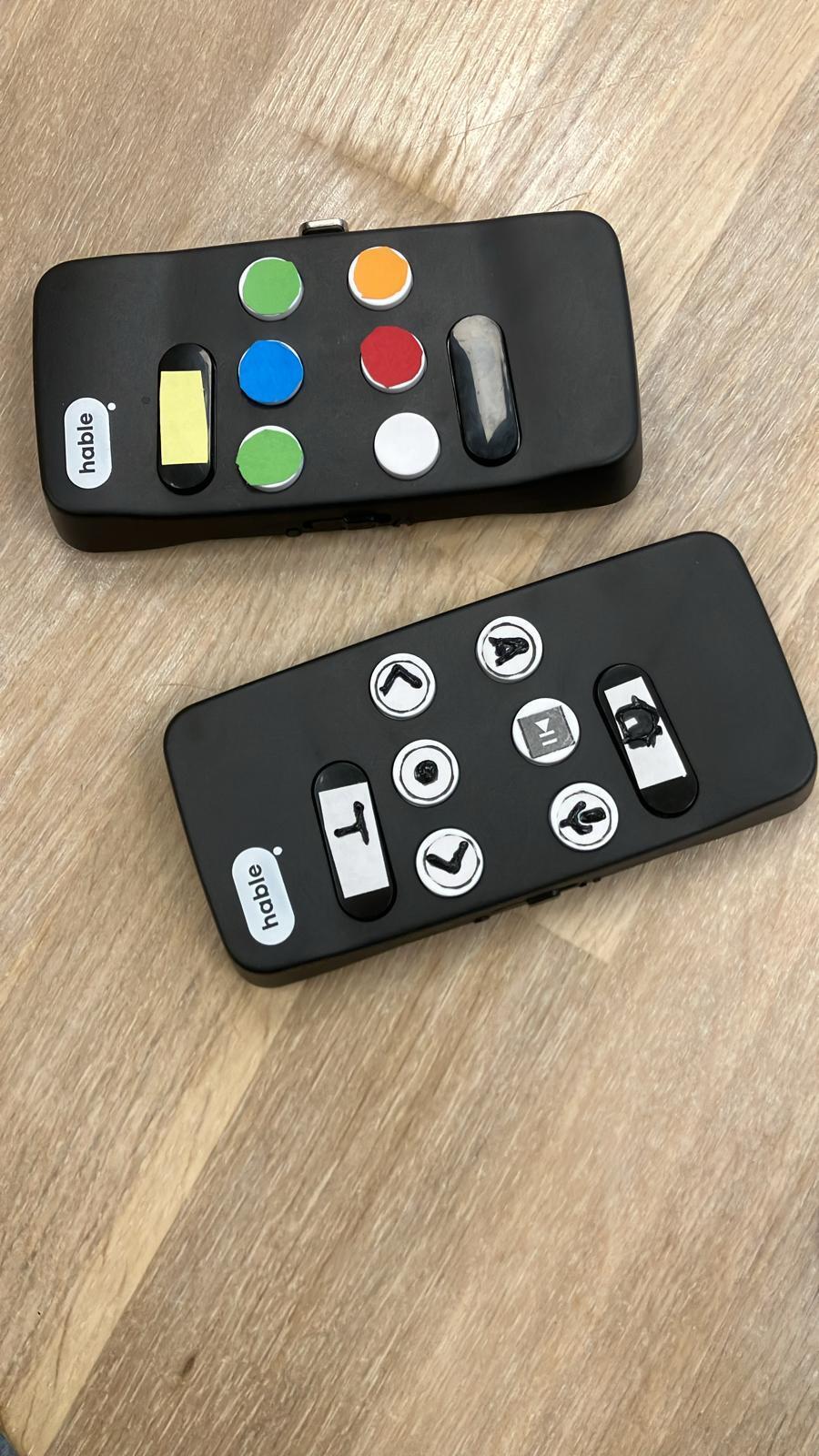
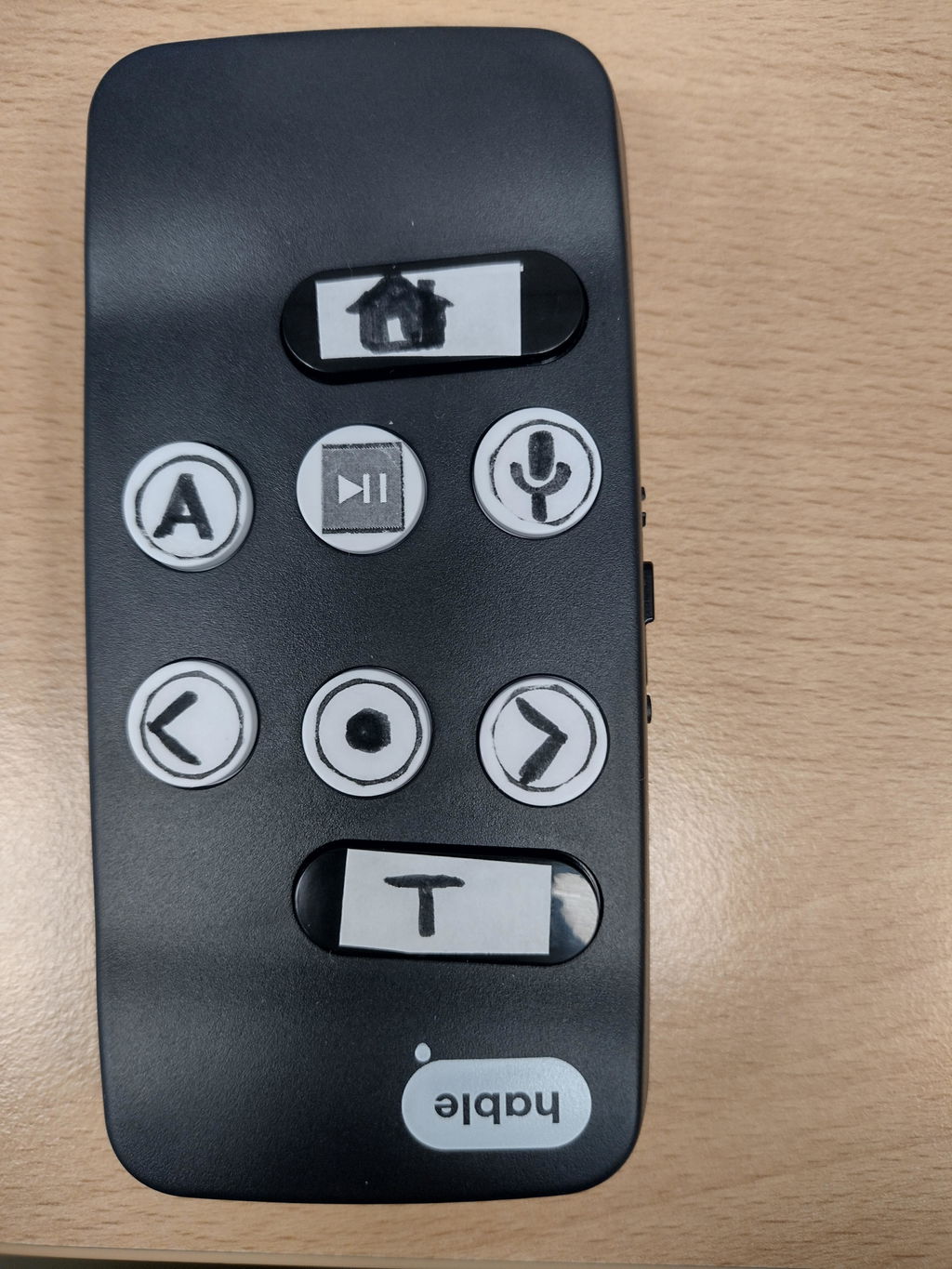
The Habel easy device is an excellent device for any smart phone user who wants an easy way to control their iPhone when VoiceOver is used. It takes away the complexity of touchscreen gestures with nice easy physical buttons to feel with specific raised symbols for each particular button. Fantastic device. Thank you, Habel.
I have functional neurological disorder and suffer from dozens of different symptoms. The Hable, however, I thought would be key to me continuing my studies into the evening despite being too fatigued to move my arms and my vision being too blurry to see the screen. This happens later in the day, nearly every day. I have been using VoiceControl, VoiceOver and the Hable with my iPhone and it has been fabulous!! My laptop can't handle installing VoiceControl, but once I get a new one, I hope to use the same combo on my laptop.
I'm really only using 4 buttons right now, Move to next, Move to previous, Select an item and VoiceOver master tap. Some of the little stickers broke when I tried to remove them from the plastic to apply them to the buttons, but just having a couple on there is fine, so I can orient myself.
I am fairly new to controlling my devices with voice, but am hoping to explore the Hable's Rotor and Braille inputs next.
I struggle with cognitive overload, so I know the Hable can do more, but I need to learn each feature slowly so I don't get overwhelmed and forget everything.
Truly an amazing device! Thank you so much for the thought and care that went into creating it!
Hable Easy is really easy and An incredibly wonderful discovery for those who are visually impaired.
The Hable Easy makes it a lot easier to use my SmartPhone, and to navigate. It is light and very portable. It is easy to open an app, and to navigate between apps. I haven't used the voice commands so far, but it is a wonderful device to assist in using the phone, and very versatile. I would recommend it to anyone who has difficulty in using their phone and navigating the screen.
I have the Hable easy and I am enjoying it immensely. Thank you very much for coming up with this idea.
Since acquiring the Hable One, it's become an indispensable part of my daily phone use. I find it incredibly simple to navigate my phone, whether for everyday tasks or reading books, which previously felt cumbersome. The device's intuitive design makes it enjoyable to flick through entire books effortlessly. I utilize both the Hable Easy mode and the Hable One, which seamlessly enhances my phone experience. It's a game-changer!
MY SON WOULD HAVE BENEFITED FROM THS CONTROLLER IF HE HAD KEPT BETTER MEMORY AND SENSATION ON BOTH HANDS.
One particular story - a transition-aged student (young adult post-high school) who has high needs due to numerous complicating health issues has very little hand-strength or stability, so using gestures or the Hable One weren't really options for her. She has trouble both holding her heavy phone and executing gestures smoothly, and doing both at the same time was frustrating for her. I tried using a QWERTY keyboard arrow keys to see how well she could interact with buttons, which was moderately successful. Then, when we got the Hable One switched over to Hable Easy software, we tried that with her. With instructor verbal guidance, she opened her email and read through a document attachment by herself! She also used the Siri activation button since she also doesn't always have clear speech, so activating it then using it that way worked pretty well.
We were only able to demo it during this one 90-minute session with her so far, but I am looking forward to the next time she comes up for one of our overnight camps so that we can continue working with her on it to see if it is the right investment for her family to make (I certainly think that it will be!).
Furthermore, There’s no bluetooth lag. Every other braille input device I’ve used has been so laggy I can barely use it and had to be connected to my phone as a braille display, which precluded me from using anything else that would connect in that manner.
Also, customer service is amazing. I emailed support because I had a few questions, and they got back to me quickly and were able to assist me with the issues I was having.
This purchase is literally one I don’t think you’ll regret.
A game changing device for blind users. I enjoy how easy it is to use to access a phone using Voicemail.
Als ergotherapeuten in een revalidatiecentrum voor slechtziende en blinde personen hebben we de Hable Easy getest bij een aantal van onze cliënten. De Hable Easy is een compacte Bluetooth-bediening waarmee men eenvoudig de iPhone of iPad kan bedienen zonder de complexiteit van de traditionele VoiceOver-veegbewegingen. Dit bleek vooral voordelig voor personen die moeite hadden met het onthouden van de verschillende veegbewegingen of die motorische beperkingen ervaren, zoals een tremor of beperkte fijne motoriek.
Heb gebruik van de fysieke knoppen van de Hable Easy maken het gebruik van de iPhone veel makkelijker. In plaats van ingewikkelde gebaren moet er alleen maar de juiste knop ingedrukt worden om bijvoorbeeld de berichten-app te openen, te bellen of door apps te navigeren. Dit maakte de bediening veel minder belastend en geeft een gevoel van controle en zelfstandigheid, wat in een revalidatiecontext enorm belangrijk is.
De set van bijgeleverde stickers die op de knoppen kunnen worden geplaatst geven de gebruikers tactiele feedback over de functie van elke knop, waardoor ze zonder visuele ondersteuning eenvoudig kunnen bepalen welke knop ze moeten indrukken. Dit bleek vooral nuttig voor onze patiënten die moeite hadden met het onthouden van de functies van de knoppen, wat de drempel om de Hable Easy te gebruiken aanzienlijk verlaagde.
Samenvattend kunnen we zeggen dat de Hable Easy een waardevolle aanvulling is voor patiënten met visuele en motorische beperkingen. De eenvoudige bediening en de tactiele feedback zorgen ervoor dat het apparaat toegankelijk is, zelfs voor degenen die moeite hebben met de veegbewegingen of het onthouden van functies. Het is een aanrader voor iedereen die op zoek is naar een gebruiksvriendelijke en efficiënte manier om hun digitale apparaten te bedienen.
I cannot figure out how to move from page to page, although I seem to have mastered everything else. I have temporarily moved everything to one page, but that will not work long term because someof my folders have at least 3 pages in them.
FAQs
Who would benefit most from using Hable Easy?
Who would benefit most from using Hable Easy?
Hable Easy is especially beneficial for seniors and individuals with visual or motor impairments.
How does it simplify smartphone use for seniors or people with disabilities?
How does it simplify smartphone use for seniors or people with disabilities?
It simplifies smartphone use with easy-to-press buttons and eliminates the complexity of touchscreens.
Is Hable Easy compatible with all Android and iOS devices?
Is Hable Easy compatible with all Android and iOS devices?
Yes, Hable Easy is compatible with all Android and iOS smartphones and tablets, allowing you to use it across multiple devices seamlessly.
How does the Hable Easy connect to my phone or tablet?
How does the Hable Easy connect to my phone or tablet?
Hable Easy connects wirelessly via Bluetooth, providing a reliable and secure connection without the need for cables or complicated setup.
How difficult is the setup process for Hable Easy?
How difficult is the setup process for Hable Easy?
The setup is simple and only needs to be done once. After connecting via Bluetooth, your Hable Easy will remain connected without requiring further adjustments.
Can I use Hable Easy with other Bluetooth devices, like hearing aids?
Can I use Hable Easy with other Bluetooth devices, like hearing aids?
Yes, Hable Easy uses Bluetooth Low Energy, allowing you to connect multiple devices, such as Bluetooth hearing aids, without interference.
What types of activities can I do with the Hable Easy (e.g., making calls, messaging)?
What types of activities can I do with the Hable Easy (e.g., making calls, messaging)?
Hable Easy enables easy phone calls, messaging, media enjoyment, checking the weather, and using chat applications, all through simple button presses.
How often do I need to charge the Hable Easy, and how long does the battery last?
How often do I need to charge the Hable Easy, and how long does the battery last?
You only need to charge Hable Easy once a month, thanks to its long-lasting battery, making it convenient and low-maintenance.
Is the Hable Easy suitable for individuals with limited dexterity or motor impairments?
Is the Hable Easy suitable for individuals with limited dexterity or motor impairments?
Yes, Hable Easy is designed with large, customizable buttons, making it ideal for individuals with varying levels of dexterity. You can customize the duration of pressing the buttons, so accidental tapping does not result in issues.


